Small Business Accounting Decisions What About Internal Controls?

Internal controls are not important, initially, when you start your business from home (assuming you have no staff).
Use this search feature to quickly find the information you're looking for.
However, even at the beginning, you will want to put good bookkeeping policies and small business accounting procedures in place that have built in internal controls ... so as the pace picks up, your backside is covered ... even if it is only from yourself!
Why Do I Need Internal Controls?
John Day, MBA of Real Life Accounting explains why small business owners need internal controls in his 2008 article Starting Or Buying A New Business. Mr. Day says internal controls "protect against losses, both intentional and unintentional". He goes on to explain that these controls will: - "protect cash and other assets;
- promote efficiency in processing transactions; and
- ensure reliability of financial records."
Mr. Day recommends setting up an internal control system early ... as a preventative measure. He feels it is more effective and efficient than a system that is setup retroactively ... which I'd say is a bit like closing the door after the horse has left the barn, so to speak. He is very clear about what to do if there is only you (the owner) and your bookkeeper ... you SHOULD (my emphasis) "learn how to do some of the bookkeeping tasks so you can spot check the bookkeeper's work." I explain how you can do this in the article How to Supervise Your Bookkeeper - The Monthly Financial Review.
Suggestions For Your Consideration I already discussed How to Create An Audit Trail and Why Account Reconciliations are Necessary. These two articles show you simple internal control procedures to implement now. Here are a few more suggestions.
(1) A basic control to implement now ... if you use QuickBooks® ... is not let anyone but yourself have administrator rights. If your bookkeeper does everything (from data entry ... to issuing cheques ... to the bank reconciliation) assign managed rights. For example, you may not want the bookkeeper to be able to delete or void a transaction ... or setup new customers, vendors, and employees ... instead, you would be in charge of these types of administrative tasks. It is a good idea, if you are doing your own bookkeeping, to do your data entry with a user ID that is NOT admin. It's easy to setup in QuickBooks®.
(2) Two, easy to setup, internal controls are to use clearing accounts for customer receipts and business expenses. In QuickBooks® this means ... ... for customers, run everything through Undeposited Funds by using Invoices / Receive Payments ... or Sales Receipts in the Customer section instead of directly making a bank deposit. Your bank reconciliations will be a lot easier to reconcile ... and reduce the likelihood of inadvertently booking your sales twice. ... for business expenses, run everything through Enter Bills / Pay Bills in the Vendor section instead of using Write Cheques in the Banking section. It will reduce the likelihood of recording an expense twice or paying a bill twice. One of the benefits to you is ease in settling billing disputes. Robert Guild advises in Don't Let People Waste Your Time Doing Their Bookkeeping that you can then e-mail them a pdf attachment of the Vendor Balance Detail report so they can reconcile their billing statement errors ... saving you time. Their poor accounting practices and/or bookkeeping help will no longer take up an excessive amount of your time. Mr. Guild also points out that you can also provide a Cheque Detail report if your vendor wants to know which invoices were paid by cheque.
(3) It is also a good practice to keep signing authority to yourself. Do not allow the bookkeeper signing authority on your account ... and you should always be the one to open the bank statement from the bank. It is a deterrent to know that someone is monitoring the bank account.
(4) And I hope you know that it is not in your best interests, nor is it a good bookkeeping practice, to leave signed blank cheques with your bookkeeper to "pay the bills" ... no matter how convenient it is ... ... but if you do, at least write on the cheque "amount must not exceed $xxx (amount you estimate the cheque will be written for)" ... When you get the bank statement, quickly look at the cheques written by the bookkeeper (easily identified by your dollar amount notation).
(5) Before you sign a cheque for a bill payment, make it a policy to have the invoice attached (and any other relevant backup) so you can confirm the vendor and amount. If you have implemented invoice approvals, make sure the invoice has been approved to be paid. Mr. Day backs this up in his article (much more eloquently than I do) ... so let's be clear ... make sure that there is a paper trail for all disbursements ... which means don't make a payment if you don't have some kind of written backup documenting the expense. If you are having to pay on a duplicate invoice, make sure it is marked "duplicate" and that you have checked to ensure the original invoice has not been paid. Once an invoice has been paid, write directly on the invoice ... "paid" with the cheque number, date and, if different from the invoice, the amount paid.
(6) One last quick tip ... insist that void cheques be attached to the bank reconciliation so you can ensure it has been voided properly and cannot be re-issued. What is the correct way to void a cheque?
Write VOID diagonally across the cheque and use scissors to cut out the signatory section of the cheque.
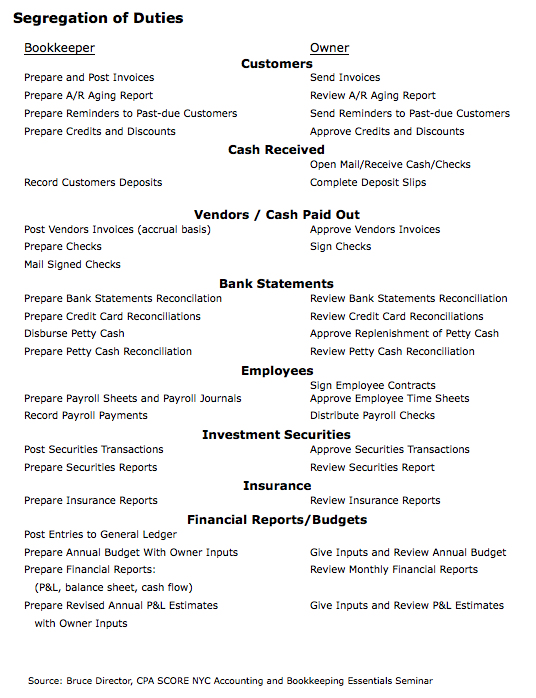
I briefly chat about fraud detection for small business accounting in The Monthly Management Review article.To reduce the probability of fraud, a basic internal control technique is to ensure there is a segregation of duties. So if you have a bookkeeper, consider this listing of how to segregate duties. It was suggested by Bruce Director, CPA for SCORE NYC at a seminar at the New York Public Library. 
As your business grows and you have more than just a bookkeeper for staff, you may need to restructure your internal controls. Your most vulnerable areas are those where unauthorized purchases and payments can happen which are: - cash disbursements;
- cash transactions;
- invoice approvals/accounts payable;
- purchases; and
- month end / year end closing.
A July 2010 article in CPA Journal titled Addressing Problems with the Segregation of Duties in Smaller Companies has some suggestions. ... Perform management reviews as a control. It requires the reviewer have an understanding of the underlying transactions, be involved in the financial reporting and inventory counts, as well as becoming familiar with the business's key operating ratios. ... Put exception reporting in place where you receive reports on new vendors or transactions over pre-set limits. ... Use third parties to assist in cash receipts handling, payroll processing, bank reconciliations or review of the general ledger. ... Rotate duties among existing personnel and ensure vacations are mandatory. This acts a fraud deterrent. ... Identify the high risk areas in your business and implement segregation of incompatible duties. For example, make sure whoever has access to cash does not have access to cash accounting records.
The goal of internal controls is to help protect you and your business against the possibility of fraud. Implementing these control procedures also reduces the likelihood of a bad tax audit because they help ensure good bookkeeping practices are being followed. Don't procrastinate on implementing these simple internal controls now. I don't know about you, but I could use a cup of tea!

These Are Good Places To Go Next
Go To How To Create An Audit Trail
Go To Benefits of Good Bookkeeping Practices
Go To Small Business Accounting Practices
Go To Home Page from Internal Controls
QuickBooks® is a registered trademark of Intuit Inc.

|