Learning QuickBooks®
Beginner's Forum For Business Owners Working From Home
by L. Kenway BComm CPB Retired
What You'll Find In This Chat

Learning QuickBooks® to avoid beginner's mistakes ... gives you a hint about what this chat is all about ... tips on how to use QuickBooks® software correctly.
While I will chat about how to use QuickBooks®, please understand that this page is directed to work from home small business owners who do their own bookkeeping.
It
is not intended to instruct the "power" users or advanced users of
QuickBooks® ... there are a lot of sites out there that cover that
material better than I ever could.
So pour some tea into your favorite teacup and let's get started.
Advertisement

QBO Canada Customizing Your Sales Tax Codes
Let me walk you through how to setup some customized sales tax codes that will make your data entry easier when learning QuickBooks® Online Canada.
Learn how to setup the meal split code in QBO Canada and how to setup a self-assessing PST code.
These two videos can assist you in preconfiguring your sales tax setup in the QuickBook Canada desktop (not online) version:
B.C. video to switch from HST to GST + PST.
P.E.I. video to switch from GST + PST to HST.
|
We are not going to be shooting the breeze about QuickBooks® POS software ... or a whole lot about advanced inventory ... ... just useful QuickBooks® tips, tricks and traps that will hopefully make your bookkeeping time more efficient ... and enjoyable ... so you have accurate financial information to make smart business decisions. You'll find a spot to ask your QuickBooks® questions at the end of this page. |
 |
good bookkeeping practice
THE BOOKKEEPER'S|TIP
Do You Have The Latest Version?
Do you have the latest version of QuickBooks 2012 or 2013? Are you using a version from 2011 or earlier? Are you aware of Intuit's sunset clause?
The 2014 version is now out. I don't switch until I know they have release 3 or higher is out. I think R1 and R2 are for those people that love the beta experience.
To check your version, press F2 (or Control + 1) and the Product Information window will open.
You can have these maintenance updates happen automatically by ensuring the Automatic Update feature is turned on.
QuickBooks Canada (and the U.S. too) only supports the last three versions of QuickBooks. This means QuickBooks 2011 will no longer be supported as of May 31, 2014. This means you will not be able to obtain technical support or business services (such as payroll or downloading your bank transactions) relating to the 2011 version after this date.
If you are learning QuickBooks® with a 2011 version, now may be the time to upgrade.
The 2014 version now lets you attach a document to a record, is supposed to automatically handle bounced cheques, have easier tracking of all income, and some improvements to the payroll center.
Learning QuickBooks® ... The Tips
I want to start by saying that you need to be kind and patient with yourself as you are learning QuickBooks®. The program was designed for small business owners and is user friendly ... but there are a few things that have to be done a certain way.
Here are links to a few tips on QuickBooks® procedures that you should learn to ease your learning curve and make your bookkeeping go smoothly:
Vendors - Accounts Payable - Expenses
- When to use Pay Bills vs Write Cheques
✔ Pay Bills is used if the bill you are paying is sitting in Accounts Payable
✔ Write Cheques/Expense is used if the bill you are paying was NEVER entered into AP - How to adjust GST ITCs for meals and entertainment
✔ CRA only allows you to claim 50% of your input tax credits for meals
Customers - Accounts Receivable - Sales
- When to use Invoice vs Sales Receipt
✔ Invoice is used if YOU are extending credit to your customer. It places the amount in Accounts Receivable.
✔ Sales Receipt is used if the customer is paying you with cash, debit card or credit card at the time of the sale. The amount does not get posted to AR. If a credit card is used, the AR is the credit card company's problem, not yours. - When to use Receive Payments vs Make Deposits
✔ Receive Payments is used if the invoice being paid is sitting in Accounts Receivable
✔ Make Deposits is used if an invoice was NEVER issued and entered into AR - The Bookkeeper's Alert on customer payments and Make Deposits
- How to enter customer prepayments/deposits in QuickBooks
- How to record net online sales revenue (less any service fees) directly deposited to your account
THE BOOKKEEPER'S TIP
How To Record Online Business Income
NEVER use Make Deposits in QuickBooks to record online business income. Interest income ... okay. Earned business income ... not okay. Why?
An important concept when learning QuickBooks is to remember it has modules ... one for customers, one for suppliers, one for employees.
You need to use the correct module to enter your data if you want it to report properly. Otherwise garbage in, garbage out as they say.
In the case of online business income such as affiliate fees, eBook sales and webinar sales, you must enter it into the customer module if you want your sales tax reports to federal, provincial, state and/or territorial governments to report correctly.
Most affiliate income earned online is not paid out immediately. If you use the accrual basis of accounting, you should be creating a bill at the end of each month for the amount you have earned. When the money is deposited to your account anywhere from 10 days to 6 months later, use Receive Payment to record the receipt of cash.
If the amounts you are earning are immaterial, for example you receive a $50 payment about every 6-12 months, it would be acceptable to not setup Accounts Receivable each month and just create a Sales Receipt when the money is deposited to your account or you receive the cheque/check in the mail.
Other information on doing business online:
- How to setup your chart of accounts to capture online income
- How do you classify web related outlays like domain registrations, web hosting services, and web design services?
- CRA and eBay income earned online
- Recording out-of-province sales
- Canadian business and US online purchases
- GST/HST rules for internet income (online sales)
H E L P ! My A/R ledger is out of balance!!!!
When learning QuickBooks, sometimes you goof. (GASP) If your Accounts Receivable ledger balance does not equal your Accounts Receivable subsidiary ledger balance, then you know you've goofed somewhere in your process. Check:
- Your Open Invoice report to ensure payments were applied to invoices. If they haven't, they will show up in the Open Invoice report.
- Your Open Balance report if your Undeposited Funds account is growing or you can't find customer payments. Look to see if any deposits were made directly through Make Deposits or even the banking register bypassing the Accounts Receivable subsidiary ledger.
good bookkeeping practice
THE BOOKKEEPER'S|TIP
Naming Convention For AR and AP
When you have a business or person that is both a customer and supplier, use this naming convention:
Joe's Plumbing - c ... for the customer (c) name and Joe's Plumbing - v for the vendor (v) / supplier name.
No more guessing the name, initials, abbreviations!
Banking - Cash
- A good way to record cash taken when it is not deposited in the bank
- How to reimburse the owner for expenses paid with personal funds
- How to handle stale dated cheques in QuickBooks
- How QuickBooks undeposited funds account works
- How to deposit loan proceeds received in QuickBooks
- How to handle NSF (bounced) cheques
- How to handle a refund to a debit card In QuickBooks desktop and online
Company - Period End Closing
Government Compliance
- When to delete vs void a transaction
- How to write-off a bad debt
- The best way to make adjusting entries in QuickBooks
- How to file GST/HST in QuickBooks® using the Quick Method
- There is a way to enter a CRA Hiring Credit through your QB Desktop Pay Payroll Liabilities window. Contact me if you need this method for backwork.
What trouble are you having learning QuickBooks®?
Learning QuickBooks® ... The Shortcuts
The QuickBooks® accounting system has keyboard shortcuts to make data entry more efficient. There are six different types or categories of shortcut keys:
- General
- Dates - my favorite category so I talk about it below
- Editing
- Help window
- Activity - I give you a few of my favorites below
- Moving around in a window
If you key in "keyboard shortcuts" to the QuickBooks® help menu, the above categories will come up. Click on the one you are interested in. Take the time when learning QuickBooks to memorize the shortcuts ... it will save you time.
My favorite shortcut keys are the dates. It is really quick and easy to enter dates using these shortcuts. They work in the desktop version AND online version.
- The + or - key can be used to increase or decrease the date by one day to the next day or the previous day. Please note the - does not work in QuickBooks Online Canada at the time of this writing.
- Typing T in the date field will give you Today's date.
- W gives you the first day of the Week
- K gives you the last day of the Week.
- M gives you the first day of the Month
- H gives you the last day of the Month.
- Y gives you the first day of the Year
- R gives you the last day of the Year.
- If you want the date calendar to pop open, your shortcut key is Alt + down arrow.
As
you can see, the keys are easy to remember because they are tied to
what you want to accomplish and they are not case sensitive ... one of
the reasons these are my favorite keys ... I can actually remember with
no effort. That is great accounting system design.
A few activity shortcut keys that are very useful ... but only in the desktop version.
Ctrl + G ... transfers you to the line/entry of the account register directly from the entry you are in ... a real time saver when working on the bank reconciliation and one of my all time favorites!
Ctrl + M ... is one I use frequently to memorize a recurring transaction or report.
Ctrl + T ... takes you to your memorized transaction list.
Ctrl
+ Y ... opens up the transaction journal so you can see the entry in
debits and credits ... bookkeepers like this one. :0) It's especially
useful when using the forms to see the other side of the entry.
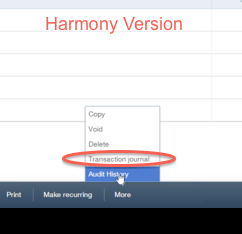
- In the QuickBooks® online version, look for "More" in the module you are in ... usually near the bottom right menu bar. You will see "transaction journal" in the popup menu. See the image on the right hand side below.
Ctrl + I ... quickly opens a customer invoice.
Ctrl + A ... brings up your COA but I prefer use my icon bar to get to my COA.
F2 let's you see the number of vendors, employees, and customers ... and the version you are using along with what updates have been installed.
F1 gets you to the contextual Help menu ... which helps to let you exhale while you are learning QuickBooks®! :0)
In QuickBooks® Online Canada you do have some keyboard shortcut keys ... just less of them. You can view your options by pressing your Control+Alt keys simultaneously. I suggest you take a snapshot of the table and keep it open on your desktop while you are learning your options.
What are your favorite shortcut keys in QuickBooks®?
Learning QuickBooks® ... The Reporting
Follow these links for customized QuickBooks® reports and other useful information to assist the management of some of your balance sheet accounts.
- What Are QuickBooks® Closing Procedures
- How to Track Cheques Issued
- How to Track Customer Deposits
- How to Track Construction Holdbacks
- How QuickBooks® Handles HST/GST
- if you are an HST/GST registrant
(GST collected vs GST paid [ITC]) - if you are NOT an HST/GST registrant
Do you have a customized QuickBooks® report that has made your job easier?
The Forum
Ask A Learning QuickBooks® Question Here
Are you learning how to use QuickBooks®? Maybe this forum can help you out ... it is strictly for beginner's ... no advanced stuff here.
Ask your beginner QuickBooks® questions here ... I promise the answer won't be to go talk to a professional.
Hopefully others who know QuickBooks® will join in too ... offering to share their expertise.
Contributions to this site are moderated. They may be edited for grammar, spelling, and presentation. (I may even change your title if I think it will help the search engines find your page.)
Your contribution will appear below once it has been approved.
Learning QuickBooks® Questions & Answers
Visitors Have Already Asked ...
Click below to see the contributions that have been made already. Enter the discussions. There is usually more than one right answer or more than one way to do something ... so tell us what you think!
You can help make Learning QuickBooks® better by adding your comments and ratings to one or more contributions.

How To Record A Double GST Payment? 
I pay my GST annually once a year. I went to the bank and did so through the teller on October 15th for $500.00.
On November 30th, the bank pulls …
How to record interest earned on loan to subcontractor
Publisher: This post was corrected January 2018. The original entries presented were incorrect. See the comments sections.
Hi, I need to record …

New Company - New Books
I have a client who has been in business for a few years as a sole proprietor. Now they have incorporated. The accounts are kept on QuickBooks.
Do I …

Sales Tax on Paid Parking Tickets
Hi there,
I am trying to enter some expenses for the partners of the business and am not sure what to do when the receipt does not have the taxes broken …

Daily Sales Summary
Our company has a website selling a high end product. As the company bookkeeper I enter each sale into our accounting software as a receivable. Once …

Fixing a QuickBooks Mess
How do I correctly fix a badly managed set of QuickBooks that hasn't been properly managed since 2010.
Specifically, how do I get the QuickBooks records/data …

How To Track Customer Deposits
I need a program that will let me track cash deposits made in advance of purchase even when no final amount has been determined. There is no time limit …

Year-end Trial Balance Report
Our company year-end date is Nov 19th. I did not enter a Closing Date in the Accounting Preferences. However, in Company Information, I had to enter a …

Entering GST/HST Late Filing in QuickBooks®
Due to circumstance,s the company I just started working for was unable to file a complete GST/HST report last quarter.
Their bookkeeping was several …

How to Fix Entries Already Reconciled
How do you adjust year end entries if they already have been reconciled.
Example: I did a journal entry for an asset under misc withdrawls, for the …
Sales Receipt Requirements
Hi,
My son is just starting his very own small-business. (He is 13). I am setting him up to use QuickBooks in its most simple form (sole proprietorship) …
HST From Purchases
Hello,
I have a question regarding entering the HST paid from purchases into QuickBooks software.
The corporation is registered for the GST/HST (although …

Recording PayPal Fees
How to deal with payment processor skimming?
I'm at a non-profit organization. If somebody donates, say, $10 through PayPal I have to issue a $10 …
How to Recover Lost Data in QuickBooks
I might have deleted some entries that change the numbers in the balance sheet.
How could I use the backup file to get the previous numbers without …
QuickBooks Receive Payment
Adjusting Accounts Receivable For Deposited But "Unreceived" Payments. BEST Solution ... Follow The QuickBooks Process.
Hi,
I have a bad habit …
Petty Cash
Petty cash has been set up.
Let's say I paid Cindy (employee) $10.50 (includes GST only) from Petty Cash for Parking Expense.
In QuickBooks, …
Sales Tax Return Already Filed
I am using my newly purchased QB and filed my current quarterly Sales Tax Return.
Now I am entering data retrospectively for the last fiscal year. …
QuickBooks Bank Reconciliation
Bank Reconciliation-has not been performed in two years
Hello,
I started assisting a small business with their bookkeeping records. Apparently …
Refund of HST
Good Day!
First of all, thank you for your great website! You answered lots of questions already, but I still have a few...
We import goods from …
Accountants Copy
Accountants Copy of over 200mb books ... and mysterious password
When the books are too large, instead of being able to email, the Accountants Copy …
Personal Expense on Business Account
I failed to follow one of the basic guidelines you mention on the web site. I charged personal items to the company credit card and paid the credit card …
Entering Invoices from a Supplier
This may be a silly question, however; I'm very new to bookkeeping and Quickbooks and see a potential problem with how our accounts were set up.
Initially …
Loan Proceeds Not Deposited To Bank
How do I record an asset paid for in installments and financed by a lender?
New to Quickbooks and double entry accounting. I understand most of …

Reverse Sales Tax Filing in QuickBooks
Good Morning Laura,
Just a quick question: Do you know if you can reverse GST filing in QuickBooks desktop??
I have a situation where I filed the …
QuickBooks Conversion
I have a customer account that used to be a Partnership - the one partner has signed off and the other has assumed all business liabilities - I now need …
Vendor Prepayments
What is the best way to deal with vendor prepayments in QB?
Client wrote a cheque for $1,900 to a vendor for a leasehold improvements item. There …
Payroll Liability Refund
Recording Tax Agency Credit in Quickbooks
Hi,
Our church uses Quickbooks Pro for accounting but we don't use the payroll module (only 1 paid …
Foreign Exchange Transactions
Income lost to foreign exchange rate changes.
I have received a cheque for payment in US dollars.
The (exchange) rate has changed and I am losing …
Interest Received in a Deposit
How do you show interest received in a deposit using QuickBooks?
I'm not sure exactly what you are asking ... so I'll answer in two parts.
…
Customer Deposits
What account should I use for deposits (received) in advance from clients?
I am using QuickBooks.
I need to know where I should deposit the payment …
Cost of Goods Sold
In a Resale Printing Corporation
How can I use this account in my business if I do resale of the printing jobs like ...
... business cards, flyers and more?
Is it right to use Cost …
QuickBooks®
Recording a Direct Deposit
How can I show fees associated with an ACH (automated clearing house) deposit in QuickBooks®?
I am doing very basic bookkeeping for a friend. She has …
Self Assessing PST 
Hi,
I live in BC and setting up bookkeeping file for my first client and I have to self asses PST on couple of purchases out of country. It is equipment …
Entries for Graphic Artist Business
My partner is a graphic arist. He produces work (brochures, for example), and has them printed at a local printer company, then they invoice him and he …
Setting up QuickBooks
Setting up previous year balances for accounts when starting in Quickbooks
I started using Quickbooks Pro 2010 at the beginning of the year and …
Accounts Receivable Clean Up
An accounts receivable has been sitting now for 1 year. I want to write it off as a bad debt.
How do I get it out of the accounts receivable and put …
Reconciliation Issues with ...
General Journal
I did not reconcile my accounts before filing my sales tax (didn't think to do this, now I know).
I've now reconciled my accounts and found numerous …
Reimbursed Expenses
Hello,
I am trying to figure out whether or not I should include recoverable expenses in line 101 of the HST report.
I work for a patent agency. …
Payment of Owner's Expenses
How do I set up an account to reimburse owner for
expenses paid?
I talk about how I like to setup my "Owed To Owner" account in QuickBooks …
QuickBooks Version
Hi,
Can I work on QuickBooks Pro 2007 for QuickBooks 2009 files?
Thanks a lot. Hi Maria,
I'm not exactly sure what you are asking.
…

QuickBooks Online FX Transactions and Conversion
I am really at lost regarding the booking my foreign exchange transactions & conversions, and need your help! Here is my situation:
Our books are in …

Inventory Entries for Restaurant
I would like to know how to transfer inventory totals into my QuickBooks. Inventory is done monthly for the restaurant/pub, but not tracked through QuickBooks. …
Downloading QBO Attachments in a Batch Not rated yet
While reading and participating in various online bookkeeping groups, I noticed the question is arising as to how you can download all the attachments …
Credit Card Bank Account Not rated yet
The company I work for has a credit card bank account and their main bank account. The person who does the bookkeeping (not me) has set up the accounting …
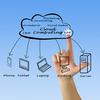
QuickBooks Online Vs. Desktop Not rated yet
I am starting a bookkeeping company for small businesses which I'd like to run solely on the Cloud.
I am wrestling with whether to purchase QB's desktop …

Inventory Assembly Not rated yet
We have a small manufacturing company. We buy a metal part from one company (first part number), then send that part to a powder coater (second part number), …

COGS Help Not rated yet
I am a bookkeeper for a painting contractor.
Can you tell me if the paint and the brushes, rollers, etc that he purchases for a specific job is considered …
Credit Card Data Entry Not rated yet
I just started using QuickBooks so I'm pretty new. I've just added our MasterCard account. Now I have all these transactions to add or split which is …
Lease - School Assignment Not rated yet
Which type of lease these are, please explain.
(a) Firdous limited is intended to acquire an asset for one season that is consisted of 6 months. Hefty …
Recording CBSA Assessed GST as ITC? Not rated yet
Hi, I'm having trouble figuring how to record GST assessed by CBSA (Canada Border Services Agency) on goods imported.
We purchased the items as supplies …
Recording Pension Income Not rated yet
How do you record Old Age Security (OAS) income being deposited directly into bank account?
Should I use record deposit but which account is it coming …
QST set up Not rated yet
Can someone help with setting up QST ITC in QuickBooks?
Currently I am splitting out the PST portion to the expense account.
Thanks.
…

Missing Sales Tax Codes Not rated yet
I have a cheque that was issued to pay HST to CRA. The cheque was entered without a sales tax code and is now showing up as an unassigned item and throwing …

GST Mapping Changes Not rated yet
I accidentally changed the GST mapping in my company account. How do I fix it? The program won't let you change from a dollar amount to a % and vice …

HST Credit Not rated yet
Hi !
Last quarter I had a credit on HST and I filled the tax return as it showed me in the Sales Tax report.
After I filled , some stuff was changed …

Trucking Fees From Vendors Not rated yet
When we receive an invoice (and goods) from our vendor(s), we are charged trucking, which I have set up under "Other" in Expenses.
However, we also …
Memorized Transactions Not rated yet
I cannot balance my memorized transaction because "ghost amounts" keep appearing from before and I cannot clear them. I have even deleted the memorized …

Cost of Goods Sold Not rated yet
I recently took a job cleaning up books for a Canadian corporation. And cleaning is an understatement! However in good spirit and in a desire to learn, …
Wrong account entries Not rated yet
I am learning QuickBooks and I am using my household like a company to record my expenses to practice and learn.
By mistake I recorded the expenses …
QuickBooks File Set up Not rated yet
Is there a certain specific way to set up a company file in QuickBooks? I have heard from some business people that their QuickBooks company file was …
Quickbooks Clean Up Not rated yet
I have a few transactions from 2010 that include some duplicate credits and duplicate bills along with some old credits. These are showing up on my Profit …

Adjusting Journal Entries With HST Not rated yet
I am trying to enter my adjusting journal entries from my accountant.
One of them consists of five lines:
1 accounts receivable
2 hst on purchases …
Cost of Goods Credit Cards Not rated yet
Hi,
80 to 90% of all my customers pay with a credit card as we operate an online store.
Should the per sale credit card charge (discount rate) be …
QuickBooks Journal Entry Rules Not rated yet
I have quarter-end journal entries (JEs) to make that look like this:
DR Other Receivables
CR Capital Stock
DR Other Receivables
CR GST Payable …
Items Multiple Unit of Measure Not rated yet
How do or can I assign an item to have 2 units of measure? ex. Flooring at 21 sq.ft per box.
If I needed 1000 sq.ft type in 1000 sq.ft under "qty", …
Prepayment to Foreign Vendor Not rated yet
I am using QuickBooks and have made a payment on account to a US vendor. I do not have a US bank account.
I have applied the prepayment to invoices …
Booking Meals & Entertainment Expenses Not rated yet
Hi There,
I am using QB and was wondering how I should book the meals and entertainment expenses given that they only have a 50% eligibility.
Do …
Printing Customer List With Balances Not rated yet
I can't print Transactions:Invoices:and only a portion of the list. Hello Nancy,
I'm not sure where you are at ... but when I want to print …
Paying Bills in QuickBooks® Not rated yet
Hey there!
I am using QuickBooks® to do the bookkeeping for a company with many bank accounts.
I understand how to enter in vender bills to the …
That's it for today. I hoped you enjoyed this introduction to learning QuickBooks® and found the information useful, practical ... and not too overwhelming.
It's been great chatting with you .
Your tutor Lake
10 Part QuickBooks® Primer
Click on any image below to go to the chat.

Part 1
Accounting System Flowchart
Learn How To Customize Reports
Closing Procedures, Tracking GST/HST/PST

Part 2
Recording Foreign Wire Transfers
in QuickBooks Online

Part 3
Setup Meals Sales Tax Code
Differences/Limitations

Part 4
Setup Self Assessing PST Codes
in QuickBooks Online

Part 5
Supplier Refunds & Credits

Part 6
Debit Card Refunds

Part 7
Beginner's Tips on A/R, A/P, Banking
Period End Closing Adjusting Entries
Shortcuts, QBO apps, Beginner's FORUM

Part 8
QuickBooks Desktop to Online
Conversion Problems

Part 9
Handling Inventory Returns for Damage Goods

Part 10
Recording CBSA Duties & GST
QuickBooks® is a registered trademark of Intuit Inc. Screen shots © Intuit Inc. All rights reserved.
Click here to subscribe to QuickBooks Online Canada. I do not receive any commissions for this referral.
Home > Bookkeeping Forums > Learn How To Use QuickBooks Forum
Bookkeeping Essentials > Developing Your Accounting System > Learning QuickBooks


Free eReport When You
Subscribe To My Newsletter
The Bookkeeper's Notes
Enjoy A Tea Break With
Me Today. Let's Chat!
Use the search feature to quickly find the
information you're looking for.
Join Me On Facebook
Help support this site by "liking" me! Here's where I post current information.
Listed Under Websites NOT Local Business.
This website is NOT associated with the business operating in Bonnyville AB.